Naver Map English Guide 2026: No Login, No Korean Number Needed
Quick answer: Naver Map works in English: set your phone’s language to English and the app follows it, showing menus, place names and transit directions in English. You can search and get subway, bus and walking directions without a Korean phone number. Since June 2026, foreign visitors can also verify with a passport to book and pay on Naver Map.
Naver Map (네이버 지도) is the map app most Koreans use, and for now it beats Google Maps for getting around Korea on foot or by transit. This guide covers how to set it up in English, how to find places whose names are in Korean, and how to follow transit directions down to the exit number.
Does Naver Map work in English?
Yes. Naver Map offers maps in four languages: Korean, English, Chinese and Japanese, plus English navigation, according to its App Store listing. Naver introduced its multilingual maps in January 2018, ahead of the PyeongChang Winter Olympics.
Not everything is translated equally. Here is what to expect:
| Part of the app | In English? | Notes |
|---|---|---|
| Menus and buttons | Yes | Follows your phone or in-app language |
| Place names, addresses, categories | Yes | Business name, address, category and details are translated |
| Visitor reviews | Yes, machine-translated | Added in October 2024 using Naver’s Papago translator |
| Restaurant filters (food type, “solo dining”) | Yes | Restaurants first, other categories later |
| Transit directions and station names | Yes | Real-time arrivals, exits, transfer info |
Naver also publishes a usage guide for foreign visitors in English, Chinese and Japanese (opened 30 December 2024), and said it would place printed leaflets at Incheon Airport tourist information centers, Airport Railroad information desks and the Myeongdong Welcome Center.
How do you set up Naver Map in English?
Install the app and set your phone to English; Naver Map uses your phone’s system language by default. Do this before you land so you can use it on the way from the airport.
- Check your phone language. If your iPhone or Android is already set to English, you don’t need to change anything. Naver says the multilingual map follows your phone’s OS language with no extra setup.
- Install “NAVER Maps, Navigation” by NAVER Corp. from the App Store or Google Play. The iPhone version needs iOS 16 or later. It’s a large download (about 475 MB on iPhone), so use Wi-Fi.
- Open the app and check the language. If it still shows Korean, open the app’s settings (설정) and look for the language option (언어). Naver applies translations based on your phone’s language setting or the in-app language setting.
- Allow location access when asked, so directions can start from “My location.”
- Make sure you’ll have data in Korea. Search, live arrivals and directions all need a connection.
Identity verification only comes in when you book or pay, covered below.
How do you find places when names are in Korean?
Search in English first, and if nothing useful comes up, paste the Korean name (상호명) or the address. Business names, addresses and categories are translated, but pasting the Korean name is the surest way to land on the right place.
- Paste the Korean name. If a friend, blog or hotel email gives you the Korean name (for example 광장시장 for Gwangjang Market), copy and paste it. This also helps when two places have similar English names.
- Use the road-name address (도로명주소). If your booking confirmation has one, it looks like a street name ending in -ro (로) or -gil (길) plus a building number.
- Search by phone number. Korean businesses list their number, and searching it is often the fastest way to land on the right pin.
- Read the reviews. Since October 2024, reviews are machine-translated into English, Chinese and Japanese, so you can check what people order before you go.
- Use filters for restaurants. Filters for food type and features like “good for solo dining” are translated too.
How do you get transit directions on Naver Map?
Tap Directions, pick public transit, choose a route and start guidance; the app then tracks your trip and alerts you before your stop. Naver added this step-by-step transit guidance (대중교통 길안내) in December 2023.
Why bother with guidance instead of just reading the route? Because the network map is the hard part. Several lines split into branches, so the same line number can take you to different ends: Line 2 has two spur lines off its loop, and Line 5 forks in the east toward Macheon or Hanam. Line 9 runs express and local trains on the same track, and express trains skip many stations. Transfers at big stations can mean long walks between platforms.
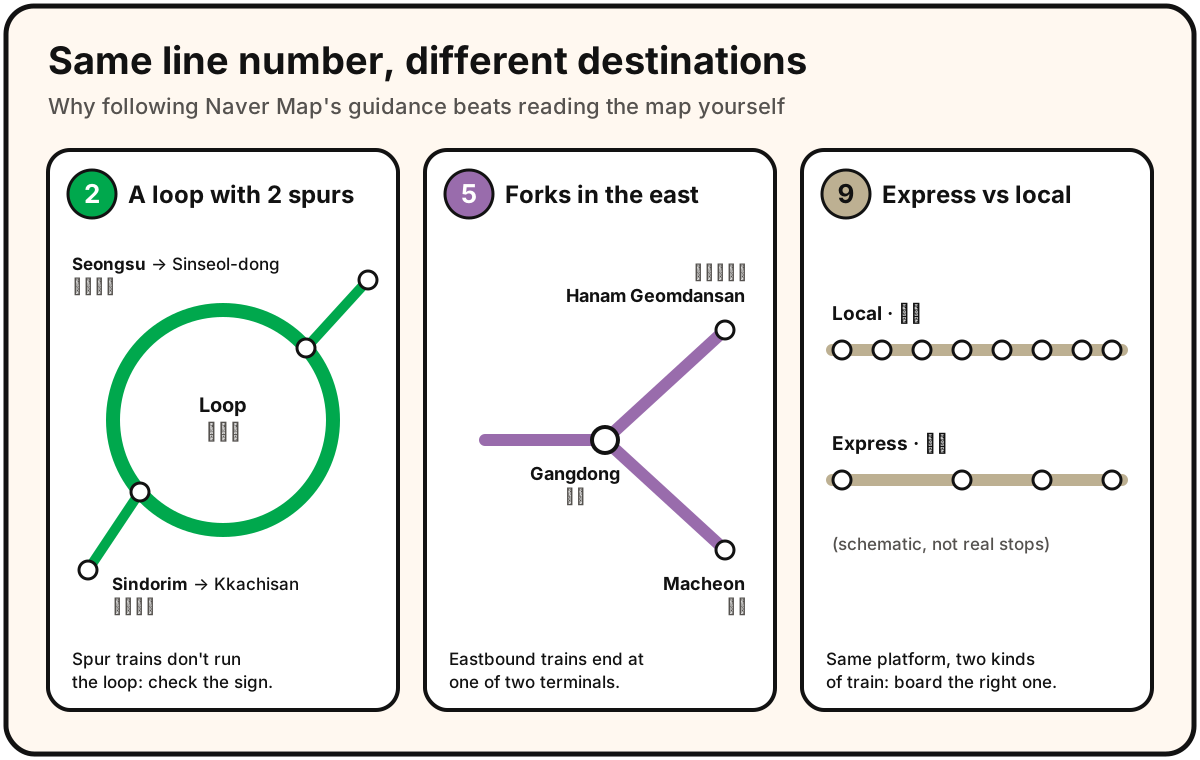
Three common traps on the Seoul subway. For the full network, see Seoul Metro’s official English route map.
Guidance takes that off your plate: it tells you which train and direction to board, counts down the stops, and tells you where to get off and which exit to take.
-
Search for your destination and tap Directions.
-
Set the start point to My location (or type your hotel’s name).
-
Choose the transit tab. Routes show total time, transfers and walking time.
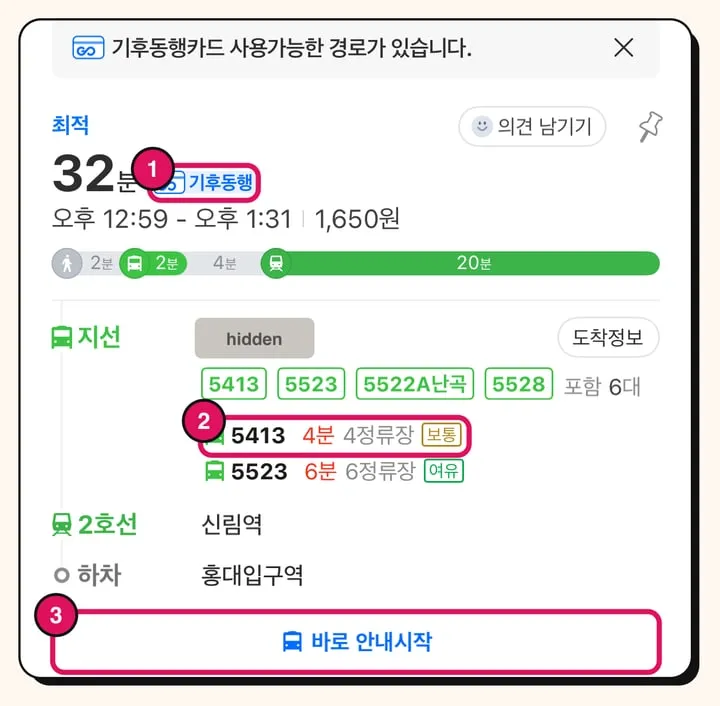
A route card from our editor’s phone (app in Korean; the nearby stop name is hidden). ① 기후동행 means the Climate Card covers this route. ② The next bus is 4 minutes and 4 stops away; 보통 is the crowding level. ③ 바로 안내시작 starts guidance.
-
Pick a route and start guidance. On iPhone, select the specific train you’ll board and the get-off alert is based on that train.
-
Follow the progress bar. The app shows how many stops or stations are left and alerts you when to get on and off, with voice guidance too.
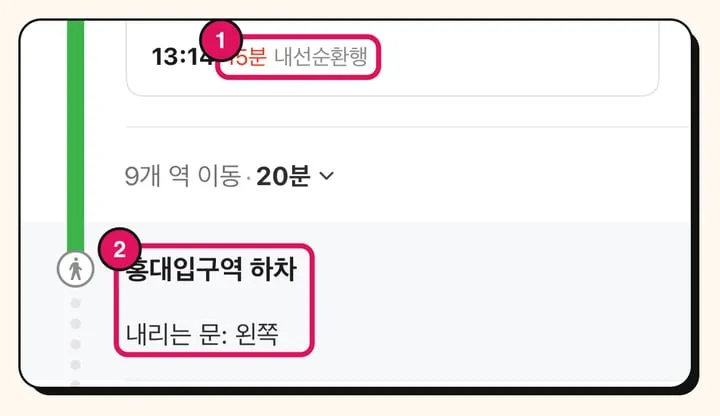
① 내선순환행 means the Line 2 train runs on the inner (clockwise) loop, so you board on the right platform. ② At Hongik Univ. (홍대입구역), 내리는 문: 왼쪽 tells you the doors open on the left.
-
At transfers, check the suggested train door position for the fastest transfer.
-
Before you leave the station, check the exit number (출구) for your destination. Coming up the wrong exit at a big station can put you on the wrong side of a wide road.
Real-time arrivals: Naver Map shows live train positions and arrival times for subways in Seoul, Gyeonggi and Incheon, and since 7 May 2025 for Busan Metro Lines 1–4. Bus arrival times are shown too.
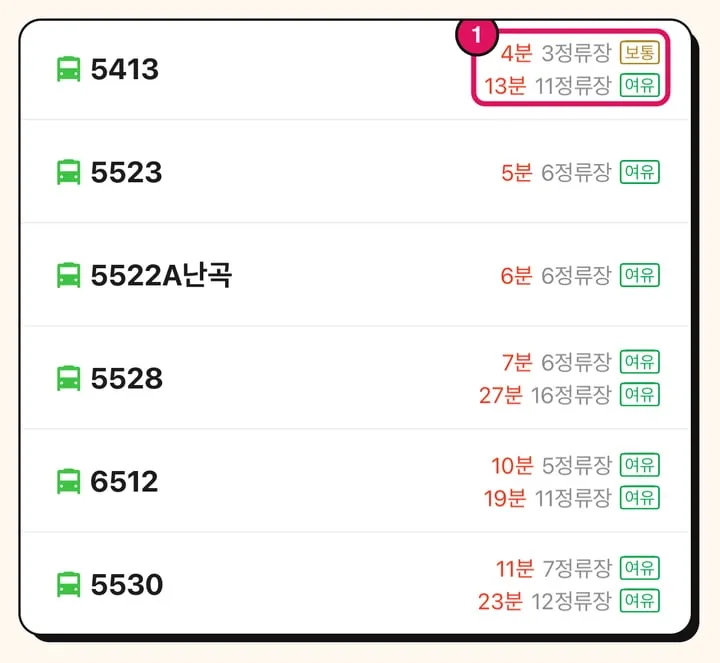
Live arrivals at a bus stop. ① Each bus shows the next two arrivals in minutes and stops away, plus a crowding label: 여유 (plenty of room), 보통 (normal) or 혼잡 (crowded).
Local tip from our editor: I live in Seoul and get around with Naver Map. Turning on transit guidance is the most relaxed way to get around, even for locals on unfamiliar routes, because you never have to watch station names. The live arrival times for buses and subways are very reliable in day-to-day use, so check them before you leave your room or café and walk out just in time instead of waiting at the stop.
Pay for transit with a T-money card or another transit card; Naver Map only plans the route. See our guide to T-money vs the Climate Card to choose one.
Do you need a Naver account or a Korean phone number?
No account and no Korean phone number for maps and directions. You can install Naver Map and search, get transit directions and use guidance without signing in; our editor uses it this way. You only need to verify yourself if you want to book or pay through Naver Map, and since 4 June 2026 you can do that with your passport instead of a Korean phone number.
Naver’s passport verification (여권 인증) is open to any foreigner holding a passport issued outside Korea. According to Naver, it works on your smartphone without a Korean number or a call to customer service, and unlocks Naver Map reservations, orders and payments. Before this, short-term visitors without a Korean number often couldn’t finish a booking.
Two things still depend on the business:
- Whether it takes foreign-issued cards. Each business chooses whether to accept bookings and payments made with overseas cards. In July 2026, Naver told The Korea Herald it planned to rename this setting from “accept foreign reservations/orders” (외국인 예약·주문받기) to “global reservation/order settings” (글로벌 예약·주문 설정). If you can’t book, the business may simply not accept foreign cards.
- Whether it takes Apple Pay or tap-to-pay at the counter. In December 2025, Naver Pay said it would start showing on Naver Map which stores have an Npay Connect (Npay 커넥트) terminal, so visitors can check in advance whether NFC payments such as Apple Pay work there.
Sharing plans is easy too. Tap Share (공유) on a place or a route to send it as a link through any messaging app. It’s a simple way to send your travel group the café, the meeting point or tomorrow’s route, so everyone opens the same spot instead of retyping Korean names.
Should you use Naver Map or Google Maps in Korea?
Use Naver Map for walking and transit directions, and keep Google Maps for saved lists from home. Google Maps hasn’t offered walking or driving directions in Korea because Korean law restricted exporting detailed map data.
That is starting to change. On 27 February 2026, the Korean government conditionally approved Google’s request to export 1:5,000-scale map data. The approval is limited to data needed for navigation and route-finding, processed on a Korean partner’s servers, with security sites blurred. No launch date for full Google directions in Korea had been announced when the decision was made. In September 2026, Korean media reported that Google was aiming to launch car navigation in early 2027, but Google hadn’t announced a date, so don’t plan your trip around it.
| Naver Map (네이버 지도) | Google Maps in Korea | |
|---|---|---|
| English interface | Yes | Yes |
| Walking directions | Yes | Not offered so far; data export approved Feb 2026 |
| Driving navigation | Yes | Not offered so far |
| Transit guidance with exit numbers and stop alerts | Yes | Check the app |
| Booking and paying in the app | Yes, with passport verification | Not covered here |
| Best for | Getting around day to day | Your saved list from home |
Pick Naver Map if you’re getting around by subway, bus or on foot. Keep Google Maps open if you’ve built a saved list at home, then look each place up on Naver Map before you go.
What changed recently
- 7 May 2025: Real-time subway information on Naver Map expanded from the Seoul capital area to Busan Metro Lines 1–4.
- December 2025: Naver Pay announced it would flag stores with Npay Connect terminals, which accept NFC payments such as Apple Pay, on Naver Map.
- 27 February 2026: The government conditionally approved Google’s export of 1:5,000 map data for navigation. No launch date was announced.
- 4 June 2026: Naver launched passport verification, so foreigners can book, order and pay on Naver Map without a Korean phone number.
- July 2026: Naver said it would rename the merchant setting for accepting overseas-card bookings to “global reservation/order settings.”
FAQ
Do I need a Naver account or a Korean phone number to use Naver Map?
No. Search, directions and guidance work without signing in and without a Korean number. You need to verify yourself only to book, order or pay, and since June 2026 you can do that with your passport instead of a Korean phone number.
Why is Naver Map still showing Korean?
Naver Map follows your phone’s system language. If your phone is set to English and the app still shows Korean, check the language option in the app’s settings (설정), then restart the app.
Does Naver Map work outside Seoul?
Yes. Naver has offered nationwide bus and transit directions since 2011, and real-time subway information covers the Seoul capital area and Busan Lines 1–4.
Does Naver Map tell me which subway exit to use?
Yes. Transit guidance shows the exit number (출구) for your destination and the train door position for the fastest transfer.
Can I book restaurants on Naver Map as a tourist?
Often, yes. Verify with your passport, then book where the business accepts foreign-issued cards. If one restaurant won’t take your card, try another nearby.
Related guides
 Apps & Payments
Korea Travel Apps: Which Ones Work in English (2026)
The Korea travel apps to install: Naver Map, Papago, k.ride for taxis and the new Korail+ for KTX and SRT trains. Which work in English, and which don't.
 Apps & Payments
Apple Pay in Korea 2026: Does It Work With a Foreign Card?
Apple Pay works in Korea with a foreign card only at tap-to-pay terminals. For the subway, Wallet T-money tops up with Mastercard or Amex, not Visa.
 Apps & Payments
Kakao T for Foreigners (2026): Which Foreign Cards Work, How to Pay
Kakao T for foreigners: Visa, Mastercard, JCB and Amex work for taxi auto-pay if the name matches your account. Setup steps, fees and the k.ride option.
Sources
- NAVER Corp. — Naver Map opens English, Chinese and Japanese usage guide for foreign visitors (Korean, 30 Dec 2024)
- NAVER Corp. — Passport verification for foreign users: book and pay on Naver Map without a Korean phone number (Korean, June 2026)
- NAVER Corp. — Naver Map launches step-by-step public transit guidance (Korean, 11 Dec 2023)
- NAVER Corp. — Real-time subway information expanded from the capital area to Busan (Korean, 8 May 2025)
- NAVER Corp. — Npay and Korea Tourism Organization expand Npay Connect terminals for foreign tourists (Korean, 1 Dec 2025)
- NAVER Corp. — Nationwide bus and transit directions on Naver (Korean, 2 Jun 2011)
- NAVER Corp. — Naver Map app overhaul with four-language maps (Korean, 24 Jan 2018)
- Ministry of Land, Infrastructure and Transport — Google 1:5,000 map export approved with security conditions (Korean, Feb 2026)
- Korea.kr — Government decision on Google's 1:5,000 map export request (Korean, 27 Feb 2026)
- App Store — NAVER Maps, Navigation (US listing)
- Newsis — Naver Map adds English, Chinese and Japanese translation of place reviews (Korean, 2 Oct 2024)
- Hankyung Magazine — Google Maps directions in Korea after the conditional map export approval (Korean, 27 Feb 2026)
- Herald Business — Google and Uber navigation deal; Google aiming for Korean navigation launch (Korean, 18 Sep 2026)
- The Korea Herald — Naver to rename the 'foreign reservations' merchant setting (Korean, 16 Jul 2026)